




Understanding Ledger Wallets: How Hardware Crypto Wallets Operate

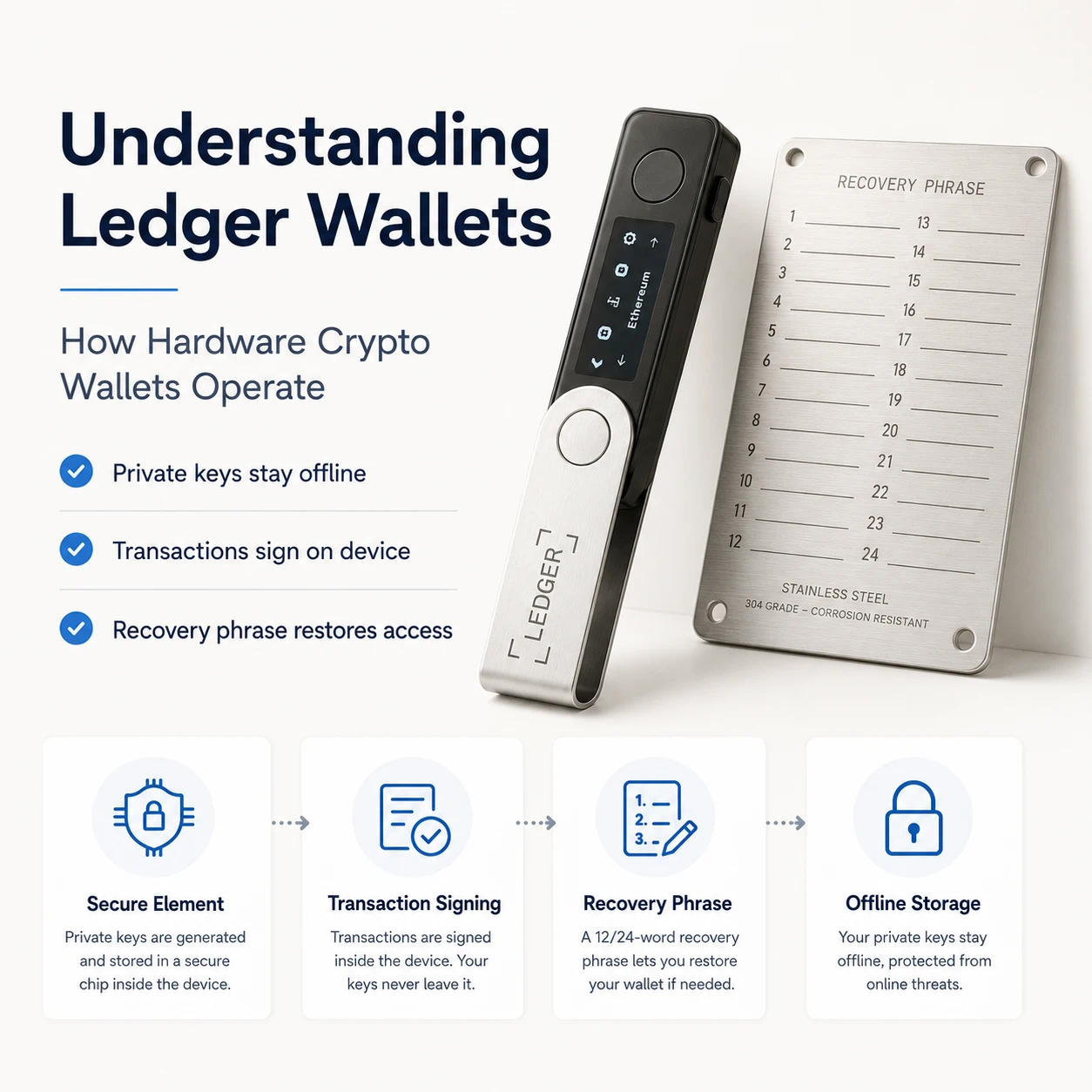
A Ledger device is often described as a place to “store crypto.” That explanation is convenient, but technically incorrect.
Your cryptocurrency does not sit inside a Ledger device. It remains recorded on its respective blockchain. What the device protects are the private keys that authorize transactions from your blockchain addresses.
This distinction is the foundation of hardware wallet security.
A Ledger hardware wallet acts as a secure signing device between your private keys and an internet-connected computer or smartphone. The connected application can prepare transactions and communicate with blockchain networks, but the sensitive signing process takes place inside the Ledger device.
Understanding this separation helps explain both what a Ledger wallet can protect—and what security responsibilities still belong to the owner.
What Is a Ledger Hardware Wallet?
A Ledger hardware wallet is a dedicated electronic device designed to generate, protect and use cryptocurrency private keys in an isolated environment.
Ledger increasingly describes its devices as signers, which is technically more precise. The device does not contain your blockchain assets. Instead, it proves that you control the private keys required to authorize transactions. Your balances remain on public blockchain networks.
A typical Ledger setup has two separate components:
- The Ledger hardware device, which protects private keys and signs transactions.
- The Ledger Wallet application, formerly known as Ledger Live, which displays accounts, prepares transactions and communicates with blockchain networks.
Ledger began replacing the Ledger Live name with Ledger Wallet in late 2025. The application remains the companion interface used with Ledger hardware devices.
This division of responsibilities is important. The computer or phone handles connectivity, while the Ledger device handles cryptographic authorization.
Private Keys: The Information That Actually Controls Your Crypto
Every blockchain account is based on cryptographic keys.
A public address can be shared with other people so they can send assets to you. A private key is the secret used to authorize outgoing transactions.
Anyone who gains access to the private key can generally control the corresponding blockchain assets. This is why storing private keys in screenshots, cloud documents, email drafts or unprotected software creates a serious security risk.
When a Ledger device is initialized as a new wallet, it generates the cryptographic secrets required to derive private keys and account addresses. Ledger states that its devices perform this process within their secure hardware environment rather than generating the keys on the connected computer.
The private keys are then used inside the device whenever the owner approves a transaction.
They are not supposed to be copied to the desktop application, browser extension or smartphone.
The Secure Element: The Core of Ledger’s Security Architecture
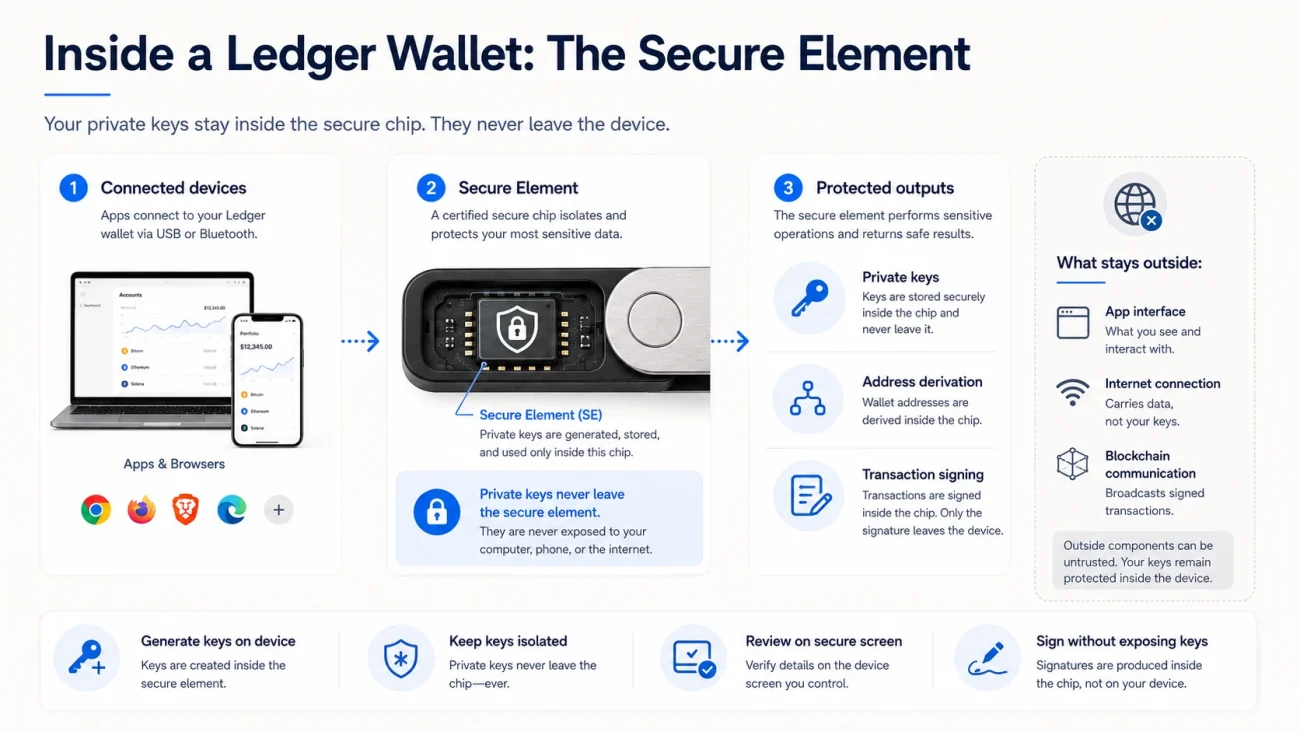
Ledger devices use a specialized chip called a Secure Element.
Secure Elements are designed for operations involving sensitive data. Similar types of security chips are used in applications such as payment cards, passports and SIM cards.
Inside a Ledger device, the Secure Element is responsible for security-critical functions such as:
- Generating cryptographic secrets
- Protecting private keys
- Deriving blockchain addresses
- Running Ledger device applications
- Displaying transaction information
- Producing digital signatures
Ledger’s developer documentation states that its device applications run under Ledger OS and perform private-key management and signing work within the secure environment.
The objective is not merely to place a password around a file. It is to create a hardware boundary between the private keys and the general-purpose device connected to the internet.
This boundary is particularly important when the user’s computer is exposed to malicious browser extensions, clipboard malware or compromised applications.
Ledger OS and Application Isolation
Ledger devices use a custom operating system known as Ledger OS, previously widely referred to as BOLOS.
Different blockchain networks require different transaction formats and cryptographic rules. Ledger therefore uses separate device applications for networks such as Bitcoin, Ethereum and others.
These applications do not hold your coins. They provide the device with the logic required to derive addresses, interpret transactions and create valid signatures for a particular network.
Ledger’s documentation explains that applications are isolated from one another. An application should not be able to read the memory belonging to another application or directly access the underlying seed.
This application model allows one Ledger device to manage accounts across multiple networks while maintaining separation between individual device apps.
Installing a blockchain app does not move assets onto the Ledger. It gives the device the necessary instructions to interact securely with that blockchain.
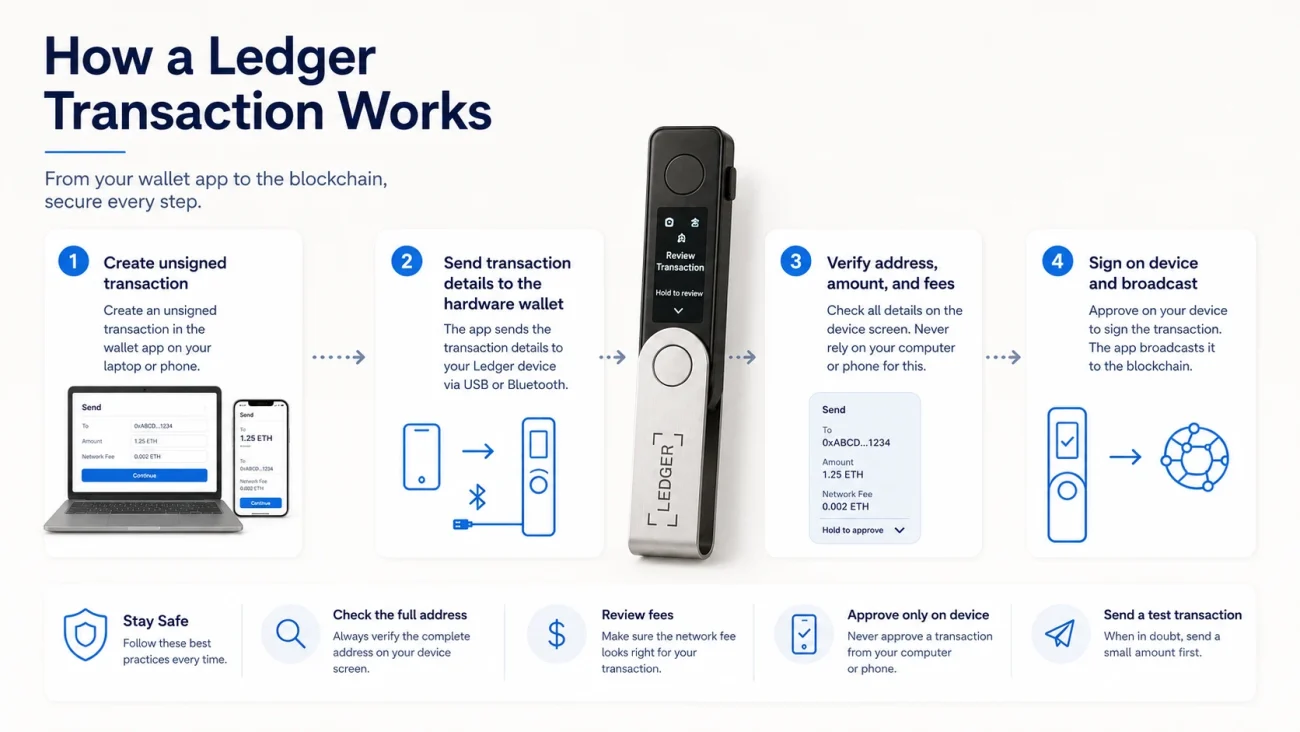
How a Ledger Transaction Works
The easiest way to understand a Ledger hardware wallet is to follow a transaction from beginning to end.
Step 1: The Wallet Application Creates an Unsigned Transaction
Suppose you want to send assets from one address to another.
You enter the destination address and amount in Ledger Wallet or a compatible third-party wallet. The application gathers the required blockchain information and creates an unsigned transaction.
At this stage, the transaction cannot yet move the assets. It still needs a valid digital signature from the corresponding private key.
Step 2: The Transaction Is Sent to the Ledger Device
The unsigned transaction data is passed to the Ledger device through a supported connection, such as USB or Bluetooth, depending on the model.
The connected computer does not send the private key to the device. The private key is already protected inside the Ledger.
Instead, the computer sends the transaction that requires approval.
Step 3: The Device Interprets the Transaction
The relevant blockchain application inside the Ledger device processes the transaction data.
Where supported, the device converts this information into human-readable details, including:
- The destination address
- The amount being transferred
- Network fees
- The type of operation
- Relevant smart-contract details
Ledger refers to readable transaction verification as Clear Signing. Its purpose is to help users understand what they are approving rather than signing an unreadable hash or generic data request.
Step 4: The User Verifies the Secure Screen
The Ledger screen is not simply a secondary copy of the computer display.
Transaction details are presented through the device’s secure environment. This matters because malware on a computer could alter the address shown in a desktop application or replace an address stored in the clipboard.
The final authority should therefore be the information shown on the Ledger device—not merely what appears on the laptop or phone. Ledger describes this principle as “what you see is what you sign.”
The owner must carefully compare the complete receiving address, amount and transaction type before approving.
Step 5: The Secure Element Creates the Signature
After the user physically confirms the transaction, the Ledger device uses the appropriate private key to generate a digital signature.
The signing process takes place inside the protected device environment. The private key itself does not need to leave the Ledger.
Only the resulting signature is returned to the connected application.
Step 6: The Signed Transaction Is Broadcast
Ledger Wallet or the compatible host application submits the signed transaction to the blockchain network.
Network participants then verify the signature and process the transaction according to the rules of that blockchain.
The Ledger device signs. The connected application communicates. The blockchain records the result.
What Is the 24-Word Secret Recovery Phrase?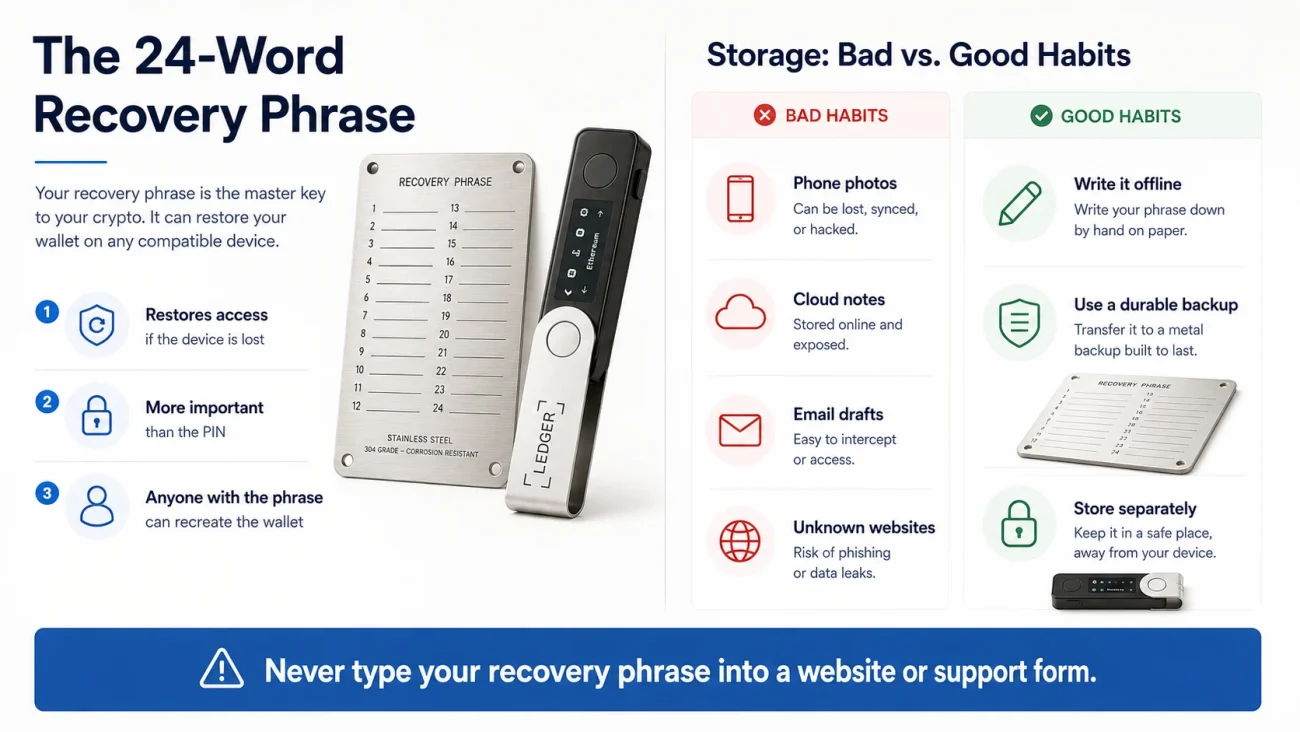
During standard Ledger setup, the device generates a 24-word Secret Recovery Phrase.
This phrase is based on the BIP39 standard and represents the root information from which the wallet’s private keys and accounts can be derived. Ledger states that its default 24-word phrase is created using random data generated inside the device’s Secure Element.
The recovery phrase is not the same as the device PIN.
- The PIN controls access to the physical Ledger device.
- The Secret Recovery Phrase can recreate access to the wallet on another compatible device.
This means the recovery phrase is ultimately more sensitive than the hardware wallet itself.
Someone who steals a locked Ledger device may still need the PIN to use it. Someone who obtains the complete recovery phrase may be able to restore the wallet elsewhere without possessing the original device.
For this reason, the phrase should never be:
- Photographed
- Stored in cloud notes
- Saved in email
- Entered into a website
- Shared with customer support
- Typed into a computer
- Imported into an unknown wallet application
The recovery phrase should only be entered directly into a trusted hardware wallet during a deliberate recovery procedure.
What Happens If the Ledger Is Lost or Damaged?
Losing a Ledger device does not automatically mean losing the assets.
The cryptocurrency remains on the blockchain rather than inside the physical wallet. As long as the owner still has the correct recovery phrase, access can normally be restored on another compatible Ledger device.
This is why a properly secured recovery backup is essential.
The hardware device can be replaced. The recovery phrase cannot be replaced without creating a new wallet and moving the assets to it.
A secure self-custody system therefore needs to prepare for two different failure scenarios:
- Device failure: solved through a correct recovery backup.
- Recovery phrase exposure: solved by creating a new wallet and transferring the assets before an attacker does.
The Hardware Wallet Is Not the Recovery Backup
Many owners secure their Ledger device carefully but leave the recovery phrase written on the paper sheet supplied during setup.
Paper is offline, which is better than storing the phrase in a cloud account. However, paper can still be damaged by moisture, handling, fading or accidental disposal.
For long-term storage, a non-electronic metal backup provides a more durable physical medium.
A CryptoSafeKit metal seed phrase plate can be used to record the recovery information without introducing an internet connection, battery, operating system or cloud account. Once correctly recorded and securely stored, the plate has no remote interface that malware can access.
This does not make the recovery phrase invulnerable.
The plate can still be:
- Found by an unauthorized person
- Photographed during setup
- Stored in an obvious location
- Transcribed incorrectly
- Kept together with the device and PIN
Metal storage reduces digital exposure and improves physical durability. It does not replace access control, privacy or careful verification.
What a Ledger Wallet Cannot Protect You From
A hardware wallet substantially changes the way private keys are protected, but it does not remove every security risk.
Seed Phrase Phishing
A fake support agent or website may ask for the 24-word phrase. Entering it gives the attacker the ability to reconstruct the wallet.
The Ledger device cannot protect a phrase that the owner voluntarily reveals.
Blind Signing
Some smart-contract interactions cannot be fully translated into readable information. When a user approves unreadable data, they may authorize an action they do not understand.
Ledger describes blind signing as approving cryptographic data without a clear human-readable explanation of the transaction’s intent.
Address Replacement Malware
Malware may replace a copied destination address before it reaches the wallet application.
The defense is to verify the complete address on the Ledger screen before signing.
Counterfeit or Preconfigured Devices
A new Ledger device should allow the owner to choose a new PIN and generate a new recovery phrase.
Ledger warns users not to use a device that arrives with a preselected PIN or pre-generated recovery phrase. The official Ledger Wallet application can also perform a cryptographic Genuine Check during setup.
Physical Recovery-Phrase Theft
A Secure Element cannot protect a recovery phrase stored in an unlocked drawer.
The device and recovery backup should be secured separately so that one physical incident does not expose both.
A Practical Ledger Security Setup
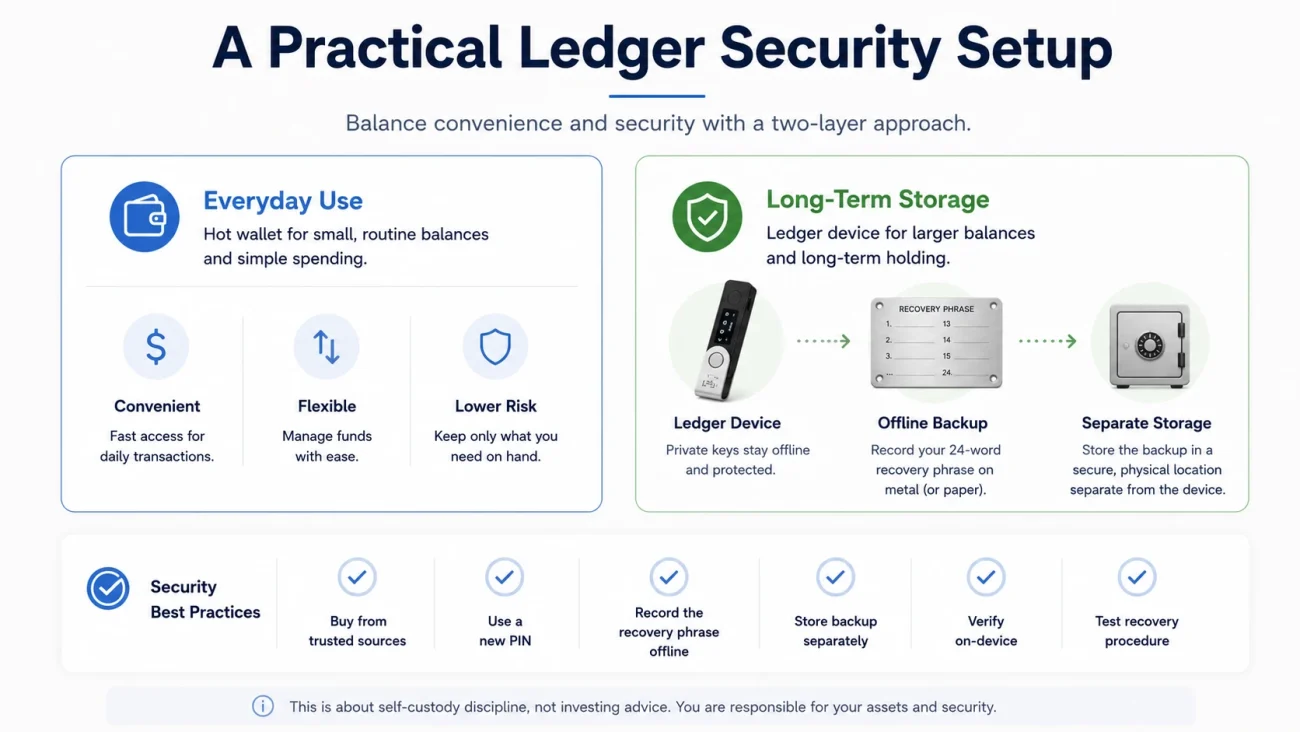
For New or Lower-Balance Users
A straightforward configuration is usually more reliable than an overly complicated one:
- Purchase the Ledger from Ledger or an authorized seller.
- Download Ledger Wallet from the official source.
- Perform the Genuine Check during setup.
- Create a new wallet on the device.
- Choose a unique PIN.
- Record the recovery phrase offline.
- Transfer the phrase to a durable metal backup.
- Store the Ledger and backup separately.
- Send a small test transaction before transferring a larger balance.
- Verify every address on the hardware device.
For Higher-Value Long-Term Storage
Users protecting more substantial holdings may need stronger operational controls:
- Use a dedicated Ledger device for long-term accounts.
- Keep routine online activity in a separate low-value wallet.
- Create and verify a durable recovery backup.
- Store the device and recovery backup in different controlled locations.
- Consider a second verified backup only when both locations can be secured.
- Test the recovery procedure before relying on the wallet.
- Document inheritance instructions without including the recovery phrase.
- Review physical access and backup condition periodically.
- Avoid unnecessary smart-contract interaction from the long-term wallet.
- Consider advanced passphrase or multisignature setups only after understanding their recovery risks.
Additional complexity is useful only when the owner can operate and recover the system correctly.
Ledger Wallet Security Checklist
Before using a Ledger for meaningful long-term storage, confirm the following:
- The device was obtained from a trusted source.
- The official application completed the Genuine Check.
- You generated the recovery phrase on the device yourself.
- No one else has seen the phrase.
- No photograph or digital copy exists.
- The phrase is stored on an offline medium.
- The hardware wallet and recovery backup are separated.
- You understand the difference between the PIN and recovery phrase.
- You verify addresses on the Ledger screen.
- You avoid blind signing whenever readable verification is available.
- You know how to restore access if the device fails.
- Your backup has been checked for accuracy and legibility.
Final Thoughts
A Ledger hardware wallet does not hide cryptocurrency inside a small electronic device.
It creates a protected environment in which private keys can be generated and used without routinely exposing them to an internet-connected computer. The connected wallet application prepares and broadcasts transactions, while the Ledger device displays, verifies and signs them.
That architecture provides meaningful protection against many common forms of remote key theft. However, the device is only one part of a complete self-custody system.
The recovery phrase must remain offline. Transaction details must be checked on the secure screen. The device must come from a trusted source. The physical backup must be durable, private and stored separately.
A Ledger protects the signing key during everyday use. A CryptoSafeKit metal backup protects the recovery information when the device is unavailable. Combined with disciplined verification and physical access control, the two provide a practical foundation for long-term cryptocurrency self-custody.