




The Most Common Private Key and Seed Phrase Scams in 2026—and How Offline Physical Storage Defends Against Them

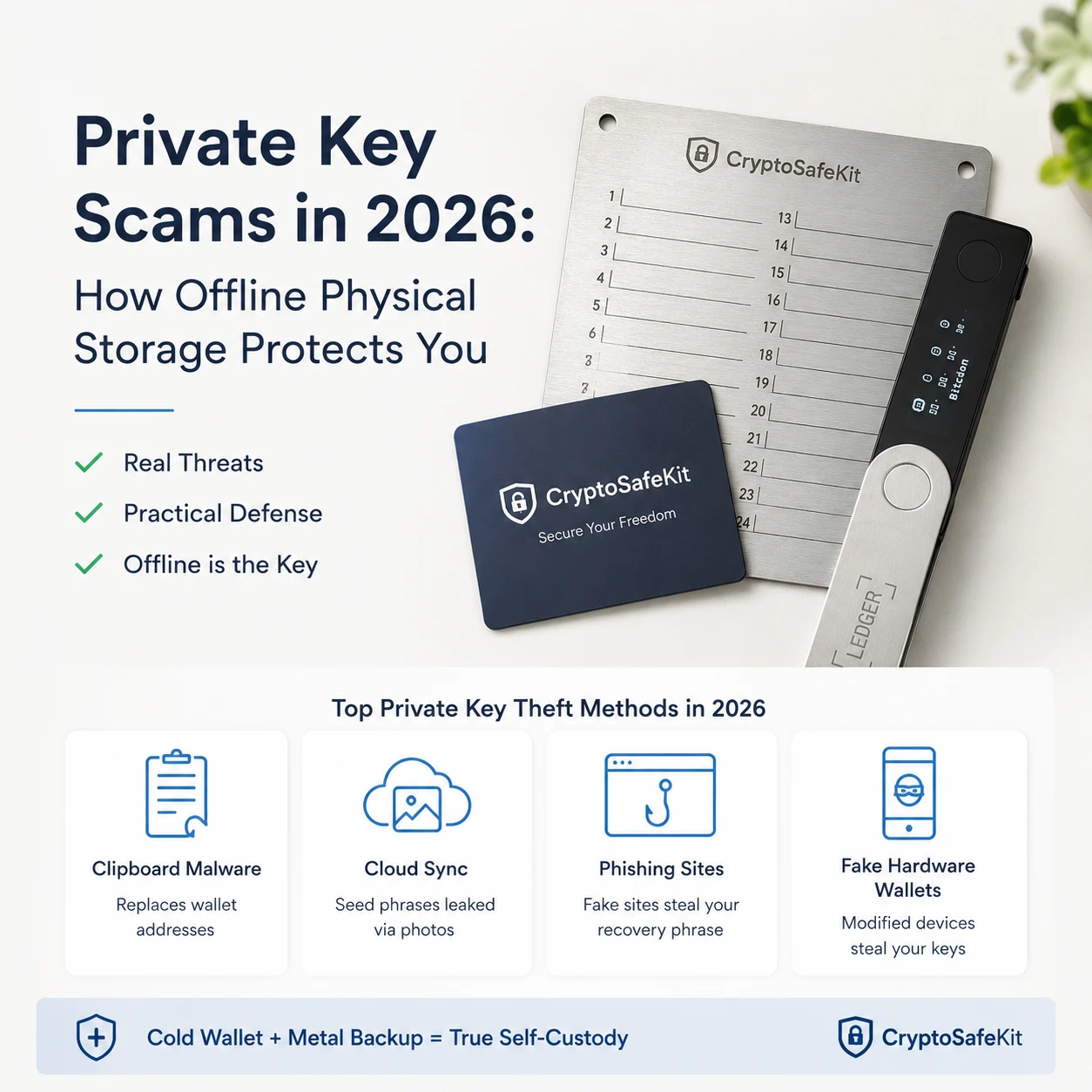
A hardware wallet can keep your private keys offline. But if its recovery phrase is sitting in your phone gallery, email inbox, cloud drive, password manager, or computer document, your wallet is not truly offline.
This is one of the most dangerous misunderstandings in self-custody.
Attackers do not always need to break the secure element inside a hardware wallet. In many cases, they simply target the human-controlled systems surrounding it: the computer used to send a transaction, the phone containing a seed phrase screenshot, the email account receiving a fake security alert, or the marketplace selling a counterfeit device.
The result is the same. Once an attacker obtains a recovery phrase—or convinces the owner to approve the wrong transaction—the hardware wallet can no longer protect the assets.
This guide examines four attack patterns that remain highly relevant in 2026:
- Clipboard malware and address replacement
- Seed phrases stored in cloud-synchronized photo galleries
- Phishing websites that request recovery phrases
- Counterfeit, pre-seeded, or physically modified hardware wallets
It also explains how a hardware wallet combined with a completely offline metal seed phrase backup can remove the most common remote attack paths without overstating what physical storage can achieve.
Not Every Wallet Theft Requires a Private Key Leak
The term “private key theft” is often used broadly, but technically, wallet attacks fall into two categories.
The first is secret extraction. The attacker obtains the recovery phrase or private key and reconstructs the wallet elsewhere.
The second is transaction manipulation. The private key remains inside the hardware wallet, but the owner is tricked into signing a transaction that sends funds to the attacker.
Both can bypass the practical benefits of cold storage.
A secure self-custody system must therefore protect:
- The private key inside the hardware wallet
- The recovery phrase used to restore that key
- The transaction details displayed before signing
- The physical supply chain of the hardware device
Protecting only one layer is not enough.
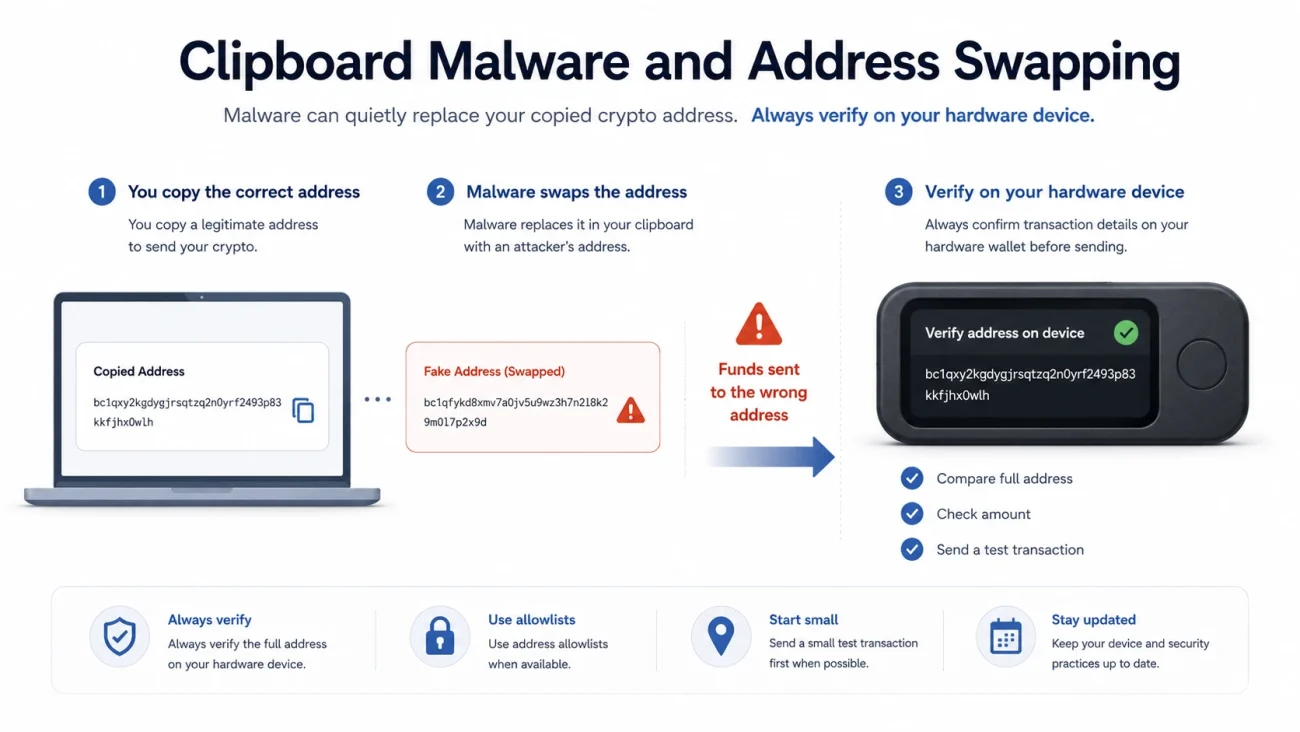
Scam One: Clipboard Malware Replaces the Destination Address
Clipboard hijacking malware monitors copied text on a computer or smartphone. When it detects a cryptocurrency address, it replaces that address with one controlled by the attacker.
The user copies the correct destination, pastes it into the wallet application, and may see an address that looks superficially similar. If the user checks only the first and last few characters, the substitution can go unnoticed.
Ledger’s current security guidance describes this attack as a clipboard hijack and warns that malicious software can silently replace a copied address before a transaction is signed. Ledger recommends treating the address displayed on the hardware wallet screen—not the computer—as the authoritative transaction information.
This attack does not necessarily extract the recovery phrase. It defeats the user by manipulating transaction data outside the hardware wallet.
Defensive procedure
Before approving any outgoing transaction:
- Compare the complete destination address on the hardware wallet screen.
- Verify the amount and network fee.
- Do not rely exclusively on a computer, browser extension or mobile application.
- Send a small test transaction when using a new destination.
- Stop immediately if the copied and pasted addresses do not match.
A hardware wallet only protects a transaction when the owner verifies what the device is actually signing.
Scam Two: Seed Phrase Screenshots Become Machine-Readable Targets
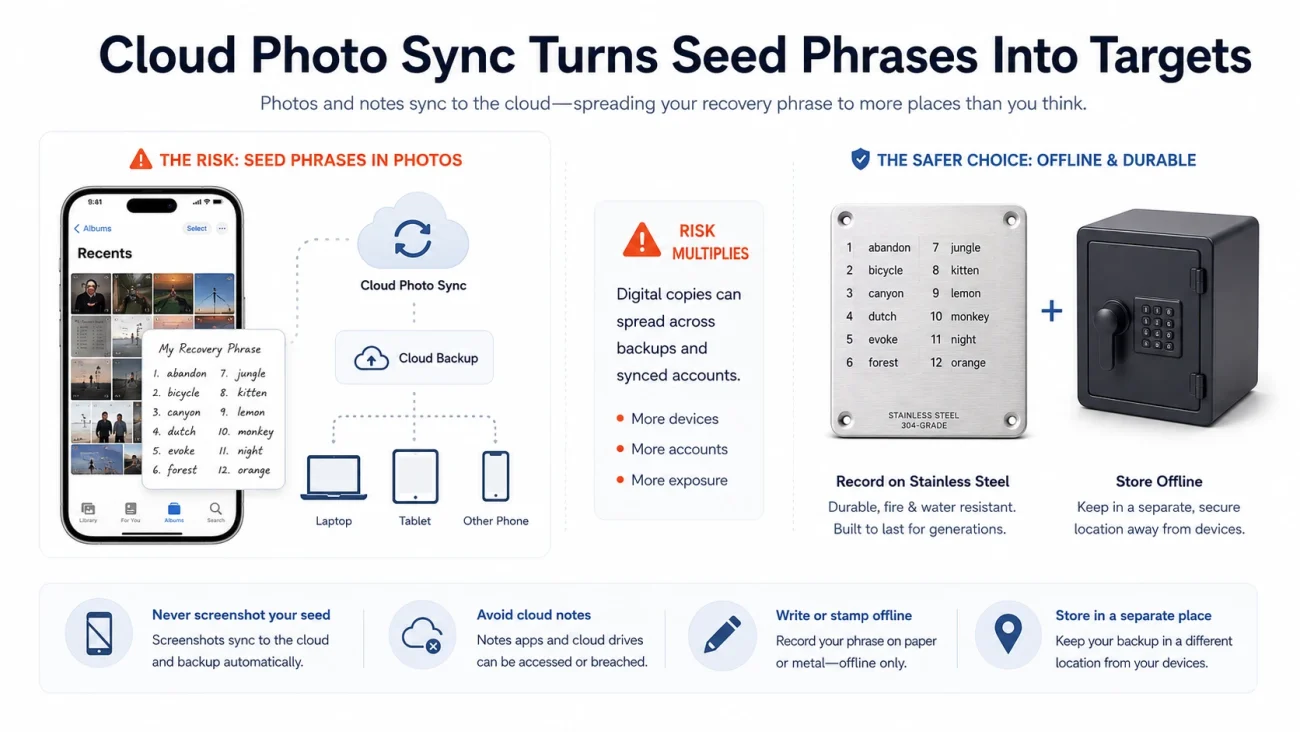
Taking a photograph of a recovery phrase may feel safer than typing it into a document. In reality, a photograph is still digital data.
Once saved to a phone, it may be:
- Uploaded automatically to a cloud photo service
- Replicated across multiple devices
- Included in phone backups
- Indexed by image-recognition software
- Exposed to applications with gallery permissions
- Recovered from deleted storage
In 2025, Kaspersky researchers disclosed the SparkCat campaign, which placed malicious components inside applications distributed through both official and unofficial app stores. The malware used optical character recognition, or OCR, to search images for cryptocurrency recovery phrases. According to Kaspersky, infected Google Play applications had accumulated more than 242,000 downloads.
A related campaign called SparkKitty continued targeting images on iOS and Android devices. Kaspersky’s first-quarter 2026 mobile threat reporting also referenced new SparkCat variants, showing that this attack model did not disappear after the original disclosure.
The important lesson is not simply that cloud services can be breached. The larger problem is replication.
A recovery phrase photographed once may exist in the original gallery, a cloud account, a thumbnail database, a device backup and every synchronized phone or tablet. Deleting the visible image does not prove that every copy has been removed.
What to do after photographing a seed phrase
Treat the phrase as potentially exposed.
Do not merely delete the photograph and continue using the same wallet. Generate a completely new wallet and recovery phrase on a trusted hardware device, move the assets to the new addresses, confirm the transfer and then retire the old phrase.
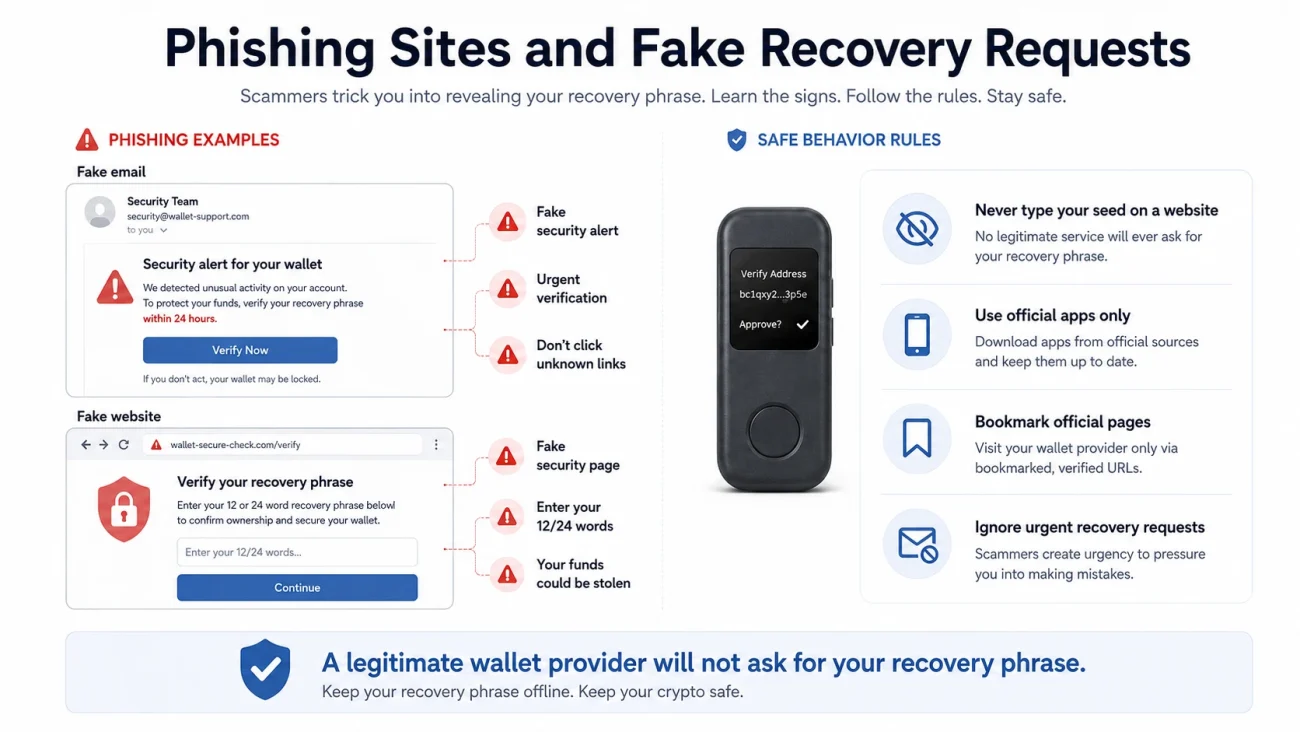
Scam Three: Fake Security Alerts Ask for the Recovery Phrase
Phishing attacks often imitate a hardware wallet manufacturer, exchange, wallet application or support representative.
Typical messages claim that:
- A firmware vulnerability has been discovered
- The wallet must be “synchronized”
- The device requires urgent verification
- An account has been temporarily suspended
- A recovery phrase must be entered to prevent asset loss
The website may closely resemble the legitimate manufacturer’s interface. The attacker does not need to compromise the hardware wallet. The victim voluntarily provides the recovery phrase.
In January 2024, Trezor reported unauthorized access to a third-party support portal containing as many as 66,000 customer contacts. Trezor stated that users’ assets were not directly compromised, but the incident created a credible risk of targeted phishing using customer names and email addresses.
Trezor has also documented an unauthorized email campaign that directed recipients to a malicious link and attempted to obtain their seed phrases.
The distinction matters: these incidents did not demonstrate that a hardware wallet’s cryptography had been broken. They demonstrated that attackers could imitate trusted communications and ask users to surrender the one secret capable of recreating the wallet.
Permanent rule
A legitimate hardware wallet manufacturer or support employee does not need your recovery phrase.
Never enter it into:
- A website
- A support form
- An email
- A browser extension
- A desktop application
- A mobile application
- A firmware update page
- An online “wallet verification” tool
The recovery phrase should only be entered directly into a trusted hardware wallet during a deliberate recovery process.
Scam Four: Counterfeit and Modified Hardware Wallets
Buying a hardware wallet from an unknown marketplace, private seller or second-hand channel introduces supply-chain risk.
Common warning signs include:
- A recovery phrase already printed inside the package
- A device that arrives with a PIN already configured
- Instructions to download software through a QR code
- An unsolicited “replacement device”
- Packaging that redirects users to an unofficial application
- A device that fails the manufacturer’s authenticity check
In 2021, altered Ledger devices were mailed to users with instructions designed to capture recovery phrases. The devices appeared to be replacement products related to an earlier customer-data leak.
In another publicly reported case in 2026, a cybersecurity researcher purchased a counterfeit Ledger Nano S Plus from an online marketplace. A teardown reportedly revealed an ESP32-based device and malicious software capable of collecting test PIN and seed phrase data.
Ledger advises customers to purchase through official or authorized channels and perform its cryptographic Genuine Check using authentic Ledger software. It also warns that a device must never arrive with a pre-generated recovery phrase.
However, authenticity checks should not be treated as a complete supply-chain guarantee. Ledger’s own threat-model documentation notes that a genuine check may not reveal every unauthorized physical modification if the original secure element remains present.
For meaningful holdings, purchasing from an authorized source is part of the security model—not merely a shopping preference.
Why Electronic Recovery-Phrase Storage Retains a Remote Attack Surface
Different electronic storage methods provide different levels of protection. An encrypted password manager is generally safer than an unprotected screenshot. An encrypted offline computer may be safer than a cloud note.
Nevertheless, every electronically stored seed phrase depends on additional systems.
| Storage method | Primary exposure |
|---|---|
| Phone screenshot | Gallery permissions, malware, cloud synchronization and device backups |
| Cloud document | Account takeover, phishing, shared links and recovery-channel compromise |
| Email draft | Mailbox compromise, session theft and retained server copies |
| Password manager | Endpoint malware, account recovery attacks and vault-export exposure |
| USB drive | Malware when connected, loss, corruption and unencrypted copies |
| Air-gapped computer | Operational mistakes, removable-media attacks and future reconnection |
| Non-electronic metal backup | Physical theft, observation, coercion and incorrect transcription |
This does not mean all electronic security tools are useless. It means that electronic storage cannot provide the same attack-surface reduction as a backup that contains no electronics at all.
What an Offline Metal Backup Actually Protects Against
A plain metal recovery-phrase backup has:
- No operating system
- No firmware
- No battery
- No network connection
- No cloud account
- No camera permission
- No clipboard
- No remote-access service
It therefore cannot be scanned, copied or exfiltrated through the internet.
This does not prove that metal storage prevents 99% of every possible wallet loss. No credible security model can assign a universal percentage across different users and threat environments.
A more accurate statement is:
A correctly created and securely stored non-electronic backup eliminates the main remote attack paths against the recovery backup itself.
It does not prevent someone from physically finding the plate. It does not protect a phrase exposed to a camera during transcription. It does not stop coercion, social engineering or careless recovery practices.
The metal plate removes the network attack surface. The owner must still control the physical attack surface.
How CryptoSafeKit Fits Into an Offline Storage System
CryptoSafeKit metal seed phrase plates are designed around this non-electronic storage model.
The plate is not a wallet application, connected device or account. It does not upload, synchronize or transmit the recovery phrase. Once the words are recorded and the plate is secured, there is no remote interface from which an attacker can request or extract the data.
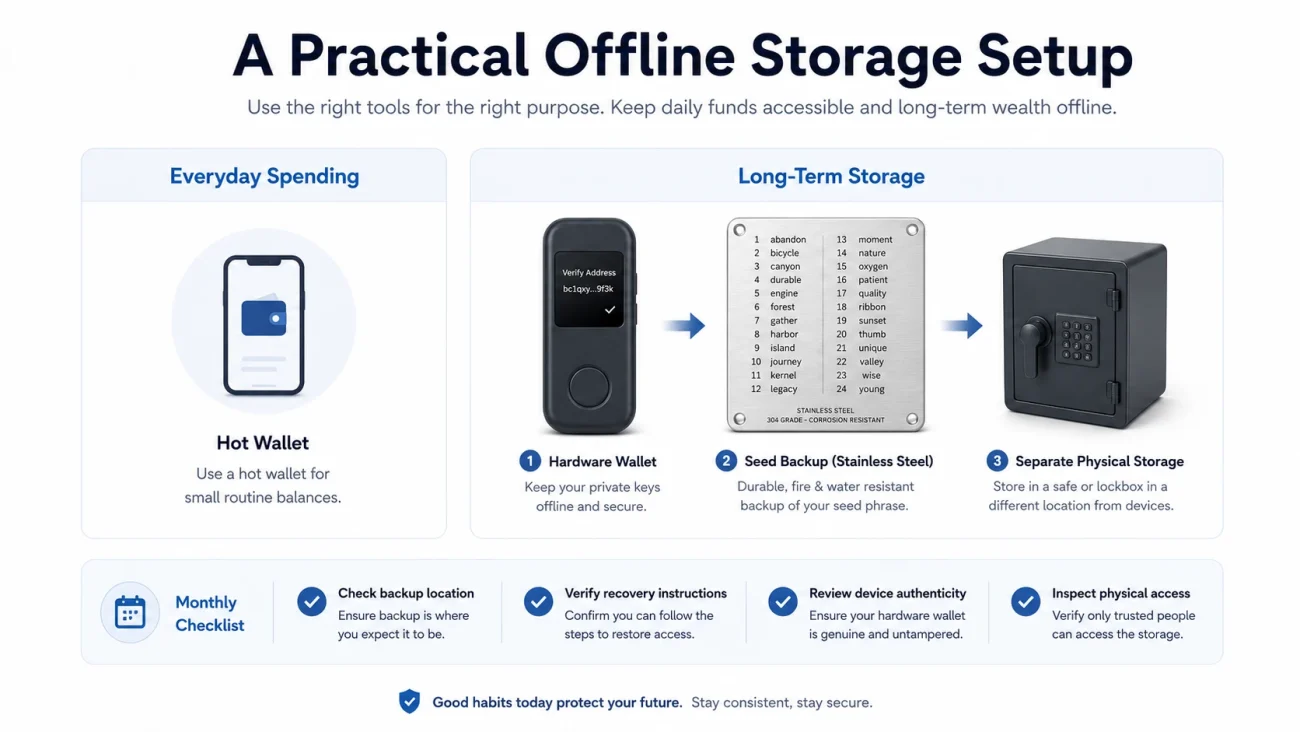
A practical CryptoSafeKit setup may include:
- A metal seed phrase plate for the recovery backup
- A protective case for the hardware wallet during storage or transport
- A signal-shielding bag for compatible electronic devices when additional wireless isolation is required
These accessories perform different functions.
The metal plate protects the recovery information from digital exposure. The case protects the hardware device from routine physical damage. A shielding bag may reduce wireless signal exposure, but it does not protect a recovery phrase and should never be treated as a substitute for proper device configuration.


VAULTIGO 4-Letter Metal Seed Phrase Backup System
Original price was: $99.00.$59.99Current price is: $59.99.VAULTIGO 4-Letter Metal Seed Phrase Backup is a reusable stainless steel backup system designed to store your recovery words offline. Built for standard English BIP39 seed phrases, each recovery word can be identified by its first four letters, helping you create a compact, organized, and durable backup without punching, engraving, or hammering.
- Stores the first 4 letters of each recovery word
- Designed for standard English BIP39 word lists
- No punching, engraving, or hammering required
- Reusable metal letter tiles
- Water and corrosion resistant stainless steel design
- Lockable structure for added physical protection
- Ideal for hardware wallets, cold wallets, and long-term crypto self-custody
Two Security Plans for Different Asset Levels
Beginner or limited-balance setup
Use a hot wallet only for amounts required for regular transactions.
For longer-term storage:
- Purchase a hardware wallet from an official or authorized seller.
- Generate a new recovery phrase on the hardware wallet itself.
- Record the phrase directly onto a metal backup.
- Never photograph, scan, type or upload the words.
- Store the hardware wallet and metal backup separately.
- Verify every destination address on the device screen.
- Keep recovery instructions for trusted family members without including the phrase itself.
Higher-value self-custody setup
For holdings where a single loss would be financially serious:
- Use a dedicated hardware wallet that is not carried daily.
- Maintain two carefully verified metal backups in separate controlled locations.
- Keep each backup separate from the hardware wallet and PIN.
- Consider a passphrase or multisignature structure only after understanding its additional recovery risks.
- Test the recovery process before transferring the main balance.
- Use a separate low-value wallet for websites, applications and routine transactions.
- Review physical access, inheritance procedures and backup locations regularly.
Complexity should only be added when it solves a defined threat. An advanced system that the owner cannot reliably recover may be less secure than a simpler, well-tested arrangement.
How to Move From a Digital Seed Backup to Metal
If your recovery phrase has ever been photographed, uploaded, emailed or typed into an internet-connected device, use the following migration process:
- Obtain and authenticate a trusted hardware wallet.
- Generate a completely new recovery phrase on the device.
- Record the new phrase directly onto the metal plate in a private environment.
- Remove phones, cameras, smart glasses and recording devices from the room.
- Verify every word and its numbered position twice.
- Use the manufacturer’s official recovery-check feature where available.
- Send a small test amount to the new wallet.
- Confirm the receiving address on the hardware wallet screen.
- Transfer the remaining assets only after the test succeeds.
- Confirm that no balances or pending deposits remain in the old wallet.
- Retire the exposed recovery phrase.
- Remove known digital copies, while recognizing that cloud replicas may not be provably erasable.
Generating a new phrase is essential. Converting an already exposed phrase from a screenshot onto metal does not reverse the earlier exposure.
Twelve-Month Wallet Security Review
January: Inventory
List every wallet, hardware device and recovery backup you control. Do not write the actual recovery phrases in the inventory.
February: Digital exposure audit
Search phones, computers, cloud drives, password managers and email accounts for seed phrase photographs or documents.
March: Device authenticity
Confirm that hardware wallets were obtained through authorized channels and pass the manufacturer’s official authenticity procedure.
April: Recovery verification
Use an official recovery-check process or a controlled spare-device recovery test. Never type the phrase into a computer.
May: Physical access review
Check who can access the rooms, safes or containers holding recovery materials.
June: Address-verification drill
Practice comparing full receiving and destination addresses on the hardware wallet screen.
July: Phishing review
Inspect recent wallet-related emails and confirm that bookmarks and downloaded applications come from official sources.
August: Backup-condition inspection
Inspect the physical backup for legibility, correct word order and signs of unauthorized access.
September: Location separation
Confirm that the hardware wallet and recovery backup are not stored together.
October: Hot-wallet reduction
Remove unnecessary balances from browser and mobile wallets used for routine online activity.
November: Recovery-plan update
Review instructions for emergencies, incapacity or inheritance without exposing the recovery phrase.
December: Full annual test
Repeat the complete threat review: digital exposure, device authenticity, backup condition, recovery procedure and physical access.
Final Anti-Theft Checklist
Before considering a self-custody system complete, confirm that:
- The recovery phrase was generated on a trusted hardware wallet.
- No photograph or digital copy exists.
- The phrase has never been entered into a website or support form.
- The backup is stored on a non-electronic medium.
- The hardware wallet and backup are physically separated.
- Every outgoing transaction is verified on the device screen.
- The device came from an official or authorized seller.
- No pre-written recovery phrase or PIN was included.
- Recovery has been tested without exposing the secret online.
- Physical access and inheritance risks have been considered.
The objective is not to make loss mathematically impossible. It is to remove unnecessary attack surfaces.
A hardware wallet isolates the private key during normal use. A properly handled metal seed phrase plate protects the recovery secret from online extraction. Together, supported by disciplined transaction verification and physical access control, they form a much stronger self-custody system than either component used alone.